Translation from English

Saturday, January 9, 2016

Gizmodo Unlock Netflix


×
In order to stay up to date with the latest Services offered by Kinja, we've made changes to our Privacy Policy, which can be found here and will go into effect on February 3. If you do not want to accept these changes, please cease using and/or accessing any websites powered by Kinja.

Use These Secret Codes to Unlock Netflix's Hidden Categories

Use These Secret Codes to Unlock Netflix's Hidden Categories

Here’s a trick that’s been around for a while but may have passed you by: secret category codes added by Netflix engineers that can help you narrow down your on-demand video choices. From classic war movies to Brazilian dramas, here’s how to dig deeper into the Netflix library.
Whenever you dive into a genre on the Netflix website you get a URL that looks something like www.netflix.com/browse/genre/6839—and if you play around with that end number you can discover some hidden gems. How about visually striking films for ages 5-7? Or period pieces? We’ve found two unofficial lists online, here and here.
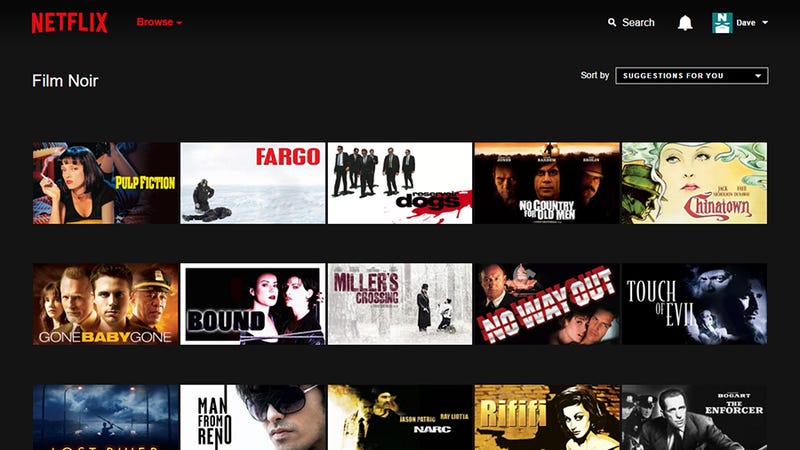
Use These Secret Codes to Unlock Netflix's Hidden Categories
Not all of these codes work, which isn’t surprising given the hidden nature of the feature, the constantly shifting Netflix catalog, and the variations between countries, but a lot of them do. It’s fun turning up a few obscure films that you might not otherwise have discovered.
If you’ve got time on your hands then it’s not difficult to build up your own list of sub-genres by changing the number at the end of the given URL. If you’re interested in how Netflix organizes its content and what these categories are for, read this Atlantic article where Alexis Madrigal first happened upon them.
Reply387 replies
The following replies are approved. To see additional replies that are pending approval, click Show Pending. Warning: These may contain graphic material.
  • I wonder how they became ordered like this... It’s odd that something so specific like “Goofy Movies starring John Candy” is ID=19
    • Are you saying you don’t often find yourself organizing by things like “Movies Featuring that fat guy from Cheers” ?
      • As a database developer it’s more then likely entirely random. I would guess that everything is grouped (or they just use a numerical system on their end) that starts broad and works it’s way down. It’s difficult to know, for sure, because every system can be set up differently, but that number is more then likely random, after taking in a collection of other factors from the database. How that database is setup, there’s a ton of options.
        Generally it’s faster to parse numbers (although I’m not sitting here saying that’s necessarily the case here, because obviously they have top engineers), but either way everything has some numerical value attached to it. When a movie is added in, I would assume it features a set number of details: Genre, actors, title, year, etc. From there, there’s some algorithm that then groups based on numerous similar factors, such as “Actor - Genre”. Over the years, netflix has continually expanded the secondary factors, such as adding delimiters to the types of comedies (in this case “Goofy”, however I’m sure there’s a ton).
        That number 19 in this case, or any of the other numbers, is more then likely randomized, based solely on how many genres existed prior to the creation of that one (and for that matter, it may alter them as the database receives more data or movies).
        So TL;DR: It’s more then likely random. It’s a number, solely because it makes more sense then saying “John/Candy/Goofy” or some other thing.
        • I hope that means “Movies starring the Disney character Goofy as portrayed by John Candy” or I’ll be very dissapointed.
          Sorry, this was a stupid joke. But I’m not jumping off this stupid joke train now.
          • I’m a software developer and personally I would’ve put the most frequently visited genres as the lowest numbers, because if any of these are used in a loop, that means every time you want to search for just “TV Shows”, you would have to pass by oddities like that Goofy Movies starring John Candy, or Suspenseful Sci-Fi & Fantasy. Probably from an organization standpoint if anyone (even a developer) would have to see this list, it would make sense to allocate big chunks like 3000-4000 for odd things, and have the very generic ones be 1-100.

            No comments:

            Post a Comment

            Please leave a comment-- or suggestions, particularly of topics and places you'd like to see covered